Entry_03 // Date: 2026-03-25 17:15:35
Interview Prep : Object Oriented Programming (with PHP)
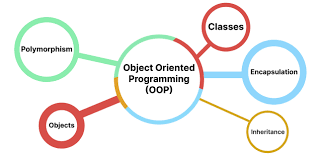
What is OOP?
Lets Talk More about Classes
<?php
class Car{
    //Properties
    public $model;
    public $color;

    // method
    function set($model, $color){
        // The 'this' keyword is used within a method to refer to the current object's properties and other methods.
        $this->model = $model;
        $this->color = $color;
    }
      // Method to display the properties
    function get() {
        echo "Model: " . $this->model . ". Color: " . $this->color .".<br>";
    }
}

?>
Now Objects!
// First Object - an object named tesla

$tesla = new Car(); // Tesla inherits all the methods and props of the class Car
$tesla->set("Model 3", "Red"); // Set Properties of Tesla
$tesla->get(); //

<!-- Second Object  -->
$jaguar = new Car(); // Jaguar inherits all the methods and props of the class Car
$jaguar->set("F-pace", "gray");
$jaguar->get();
Constructor
<?php
class Car{
    //Properties
    public $model;
    public $color;

    // method
    function _construct($model, $color){
        // The this keyword is used within a method to refer to the current object's properties and other methods.
        $this->model = $model;
        $this->color = $color;
    }
      // Method to display the properties
    function get() {
        echo "Model: " . $this->model . ". Color: " . $this->color .".<br>";
    }
}


$tesla = new Car();
$tesla->get();


$jaguar = new Car();
$jaguar->get();
?>
Destructors
<?php

class Car{
    //Properties
    public $model;
    public $color;

    // method
    function _construct($model, $color){
        // The this keyword is used within a method to refer to the current object's properties and other methods.
        $this->model = $model;
        $this->color = $color;
    }
      // Method to display the properties
    function _destruct() {
        echo "Model: " . $this->model . ". Color: " . $this->color .".<br>";
    }
}

$tesla = new Car();
$jaguar = new Car();

?>
Accessing Our Methods and Properties : Access Modifiers
the main aim of an access modifier is to restrict or allow what properties or methods can be accessed and where they can be accessed.
<?php
public $color;

public function get_car_color(){
    echo  "Color: " . $this->color . ".";
}

$tesla->color = "Pink"; // Color of tesla accessed and changed directly


// Even without using the public key word, we still have access this is because methods and properties are public by
default

//Lets create a new property and make it protected


protected $weight;

public function setWeight($weight) {
    $this->weight = $weight;
  }


$tesla->weight = "80Kg"; // Error, cant access protected property


// Lets See how it can be accessed in a derived class - i ll dive more on this later

```
class Suv extends Car {
    public function getWeight(){
        echo "Weight: ". $this->weight. " .";
    }
}

$ford->setWeight("150Kg")
$ford->getWeight(); //
?>
Inheritance 👑
<?php
// Parent Class
class Car{
    public $model;
    public $color;
    protected $weight;

    public function _construct($model, $color){
        $this->model = $model;
        $this->color = $color;
    }

    public function _destruct() {
        echo "Model: " . $this->model . ". Color: " . $this->color .".<br>";
    }

    protected function getModelType(){
        echo "Model: " . $this->model .
    }
}


// Derived Class

class Suv extends Car{

    public function getWeight(){
        echo "Weight: ". $this->weight. " .";
    }

    public function message(){
        echo "Welcome to BackOnDev Motors";
    }

    public function get_model(){
        $this->getModelType();
    }
}
?>
Overriding methods
<?php
final class Car{
    // code
}


class Car{
    final public function intro(){
        // Code
    }
}
?>
Abstract Class & Abstract Methods
<?php
abstract class Car{
    public $model;

     public function __construct($model) {
    $this->model = $model;
  }

// Abstract method - forces child classes to implement it
  abstract public function intro();
}


class Suv extends Car{
    public function intro() {
    return "Italian Cars are the best";
  }
}

// The intro class must be implemented in all the child classes. This applies also to the number of required arguments,
// the same or less access modifiers also.
?>
PHP Interfaces
<?php
// Lets test with a new example :

interface Car{
    public function makeSound();
}

class Suv implements Car{
    public function makeSound(){
        echo "Zoom!... ";
    }
}

class Bus implements Car{
    public function makeSound(){
        echo "Brr...";
    }
}


$tesla = new Suv();
$tesla->makeSound();

$school_bus = new Bus();
$school_bus->makeSound();
?>
Traits
<?php
trait logger{
    public function log(){
        echo "Hey My Name is Richey, And I am your car dealer";
    }

    public function message($message){
        echo "Hey My Name is Richey, And I am your car dealer";
    }
}

class Car{
    use logger;

     public function createUser() {
        $this->log();
    }

     public function createUserMessage() {
        $this->message("Welcome To Motor Inc.");
    }
}
?>
Static Methods
<?php
class Greeting{
    public static function hello(){
        echo "Hello Tyler!";
    }
}

Greeting::hello() // we call the static method using the (::);


class A {
  public static function welcome() {
    echo "Hello World!";
  }
}

class B {
  public function message() {
    A::welcome();
  }
}

// We can also use this with arguments.


class calc {
  // static method
  public static function sum($x, $y) {
    return $x + $y;
  }
}

// Call static method
$res = calc::sum(6, 4);
echo $res;
?>

// We can create static properties also. these properties can be accessed directly also .


class Greeting {
    public static $staticProp = "Tyler";
}
?>

// We can access the static property specify the class name the same way we are accessed the column.

Greeting::$staticProp;
PHP NameSpaces
// File 1

<?php
class User{
    public function getName(){
        return "Regular User";
    }
}

?>

// File 2

<?php
 class User{
    public function getUser(){
        return "Admin User";
    }
 }

 ?>

 // This would cause problems as PHP will see duplicate names.


 // Using NameSpace


 // File 1
//  Folder - App/User.php

 <?php

namespace App;
class User{
    public function getUser(){
        return "Regular User";
    }
}

?>

//File 2

//  Folder - Admin/User.php
 <?php

namespace Admin;
class User{
    public function getUser(){
        return "Regular User";
    }
}

?>

// Using the Classes in our current file (index.php)

<?php

require 'App/User.php';
require 'Admin/User.php';

use App\User;
use Admin\User as AdminUser;

$user1 = new User();
$user2 = new AdminUser();

echo $user1->getUser();
echo $user2->getUser();
?>